
How to Run a Content Gap Analysis in StoryMint (From Gaps to Finished Draft)
Stop guessing what to publish. Here is how StoryMint's Content Gap Analyzer finds the topics your audience actually wants, then turns the best one into a brief and a finished draft in minutes.
 Ridho Putradi S'GaraFounder, StoryMint
Most content plans start with a guess. You pick a topic that feels right, write it, publish it, and hope it lands. Sometimes it does. Often it does not, because the internet is already saturated with that exact angle, and your audience quietly scrolls past.
A content gap analysis flips that around. Instead of guessing, you find the specific things your audience is searching for that existing content fails to answer well. Those unanswered questions are your openings. They are where you can publish something genuinely useful and actually get noticed.
StoryMint's Content Gap Analyzer runs that whole process for you in four steps, then hands the best opportunities straight to a brief and a draft. Here is how to do it start to finish.
What a content gap actually is
A content gap is a topic your target audience cares about that the current top-ranking pages cover poorly, partially, or not at all. The Analyzer finds these by doing two things at once: it reads what the top search results already say about a keyword, and it measures that against a specific persona's goals and pain points. Anywhere the existing content misses what your persona needs, that is a gap you can own.
The key word is specific. A gap is only useful if it maps to a real person with a real problem. That is why the tool starts with a persona, not a keyword.
Step 1: Choose your persona
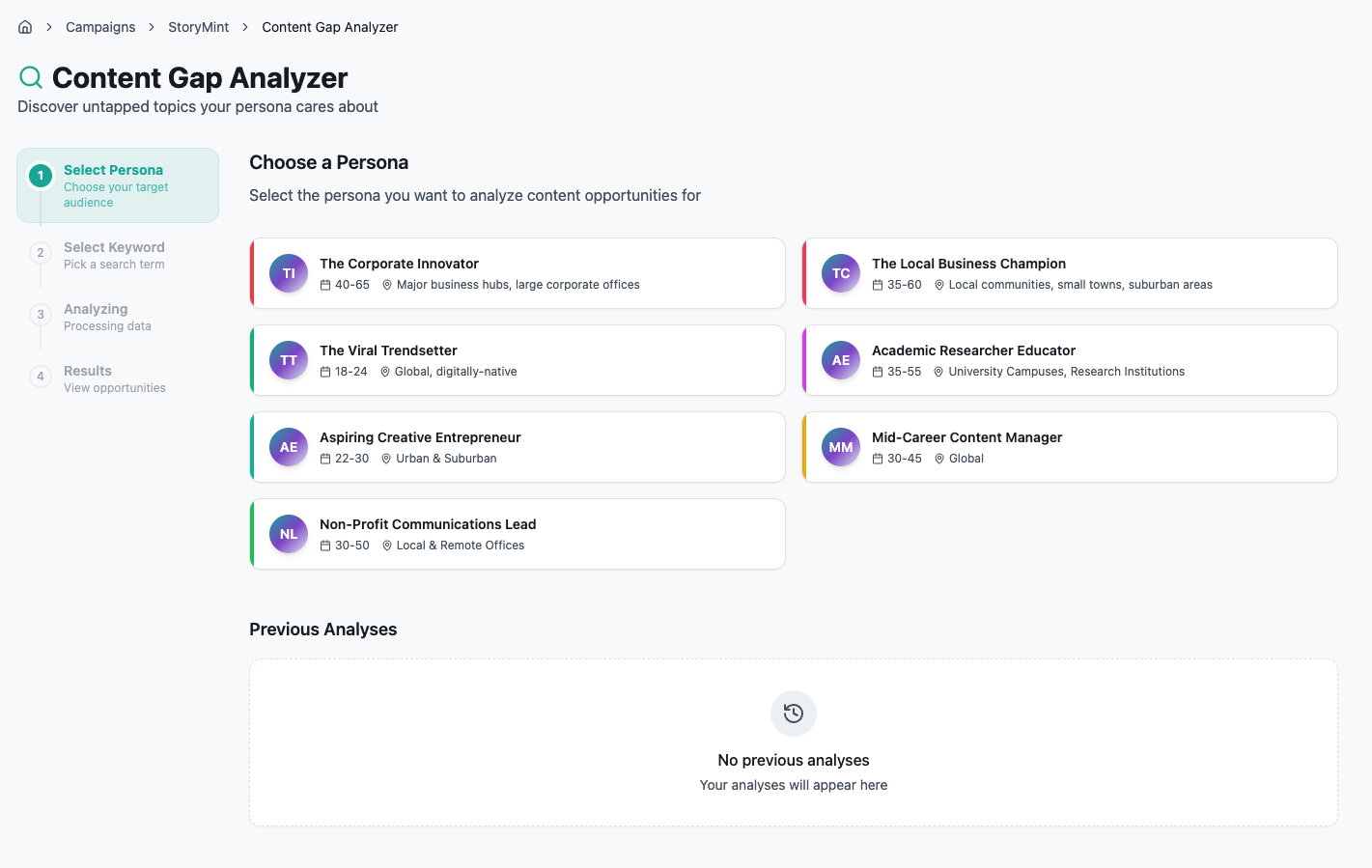
Open the Content Gap Analyzer from your campaign and you land on Choose a Persona. StoryMint shows the personas attached to your account, each with an age range and a location so you can tell them apart at a glance. You might see The Corporate Innovator, The Local Business Champion, The Viral Trendsetter, the Aspiring Creative Entrepreneur, and a few others.
Pick the one you are actually writing for. This choice shapes everything downstream, because the tool judges every search result against this persona's goals, pain points, and buying behavior. A gap for a global 18 to 24 creator looks nothing like a gap for a local business owner, so the persona you select is doing real work here, not just labeling the analysis.
Step 2: Pick a keyword
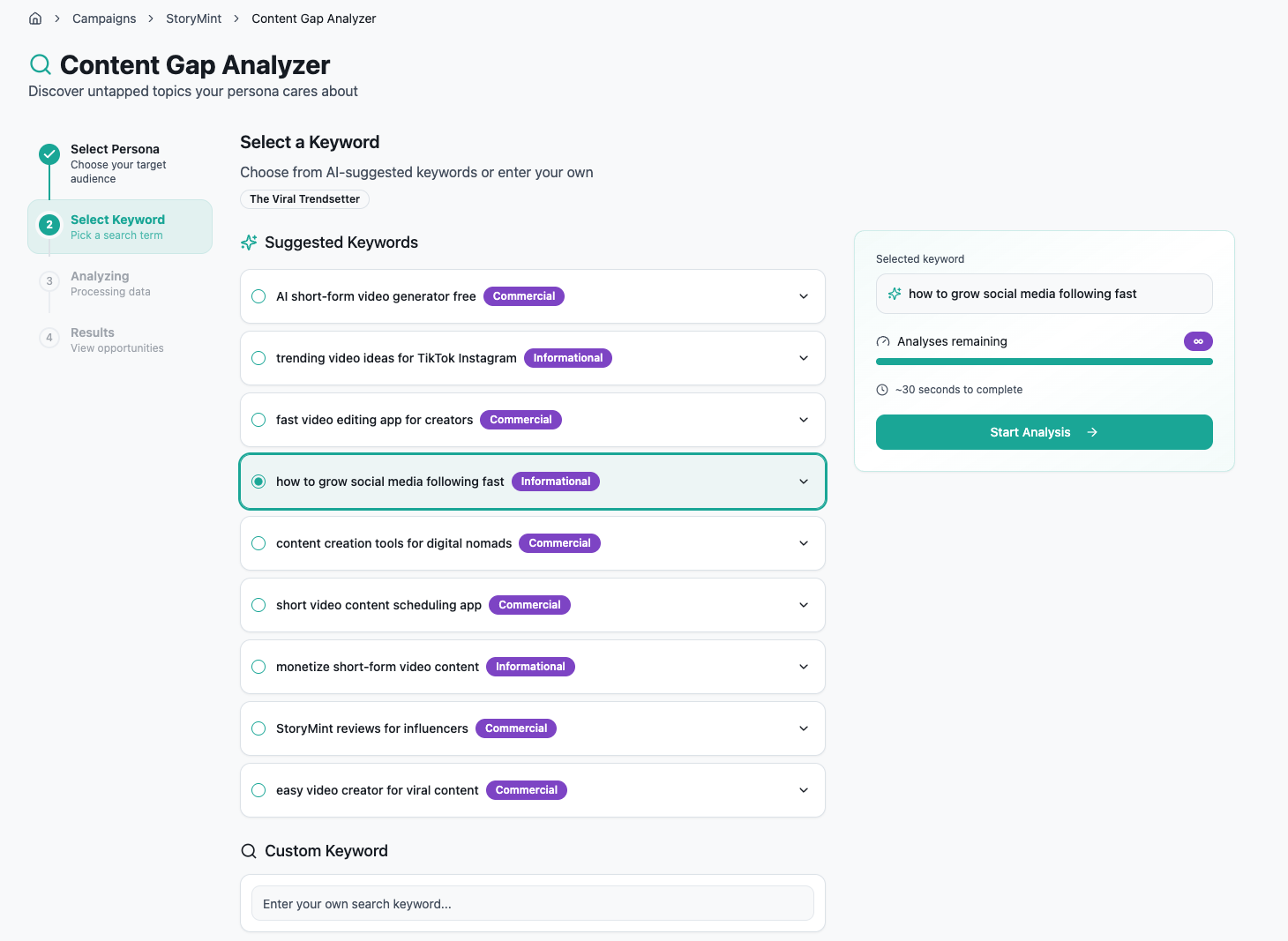
Next is Select a Keyword. StoryMint suggests a set of keywords tailored to the persona you chose, each tagged by intent so you know what kind of searcher you are chasing. Commercial keywords signal someone closer to buying, like "fast video editing app for creators." Informational keywords signal someone learning, like "how to grow social media following fast."
You can select one of the suggestions, or scroll down to the Custom Keyword field and type your own if you already have a term in mind. Whichever you pick shows up in the summary panel on the right, along with how many analyses you have remaining and a rough time estimate. When it looks right, hit Start Analysis.
A quick tip: match intent to your goal. If you want the piece to drive signups or sales, lean commercial. If you want top-of-funnel reach and trust, informational keywords give you more room to teach.
Step 3: Let it analyze
Now the tool does the heavy lifting. On the Analyzing step you will see a progress bar and a note that it is analyzing search results against your persona profile. Under the hood it is pulling the top results for your keyword, reading what they cover, and cross-referencing all of it against the persona you chose. This usually takes about half a minute, so grab your coffee.
Step 4: Read your content opportunities
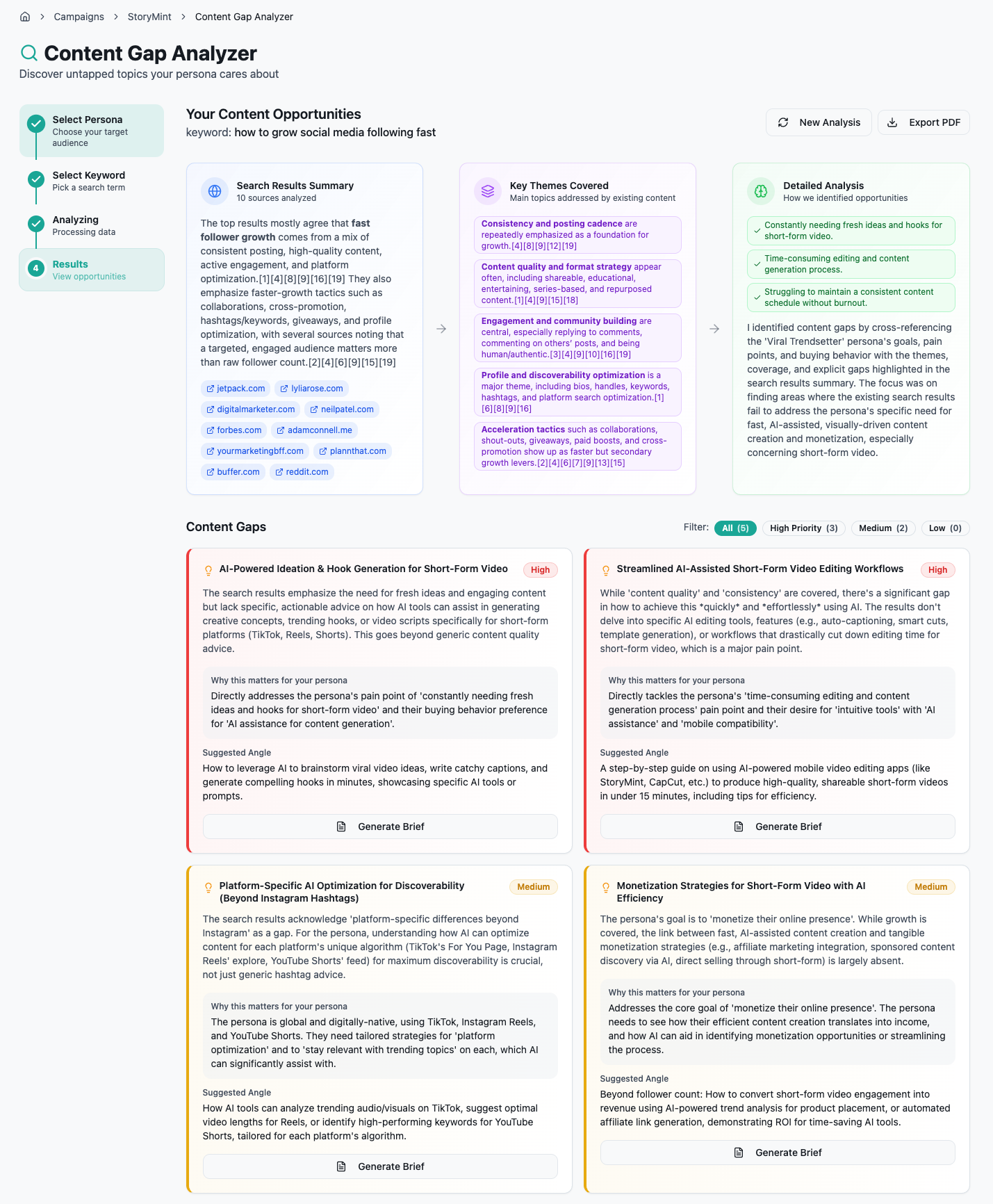
When it finishes, the Results screen gives you the full picture in three panels across the top.
Search Results Summary tells you what the top ranking pages agree on, with the actual sources listed so you can verify anything yourself. Key Themes Covered breaks down the main topics existing content already handles well, so you know what is saturated. Detailed Analysis explains how StoryMint identified the openings, by lining up your persona's goals and pain points against what the search results miss.
Below that is the part you came for: Content Gaps. Each gap is a card with a priority label of High, Medium, or Low, and you can filter to see just the high-priority ones if you want to move fast. Every card gives you three things:
A plain description of the gap and why existing content falls short
A Why this matters for your persona note that ties the gap directly to your audience's stated pain points and buying behavior
A Suggested Angle that tells you how to approach the piece
For example, a high-priority gap might read "AI-Powered Ideation and Hook Generation for Short-Form Video," with a suggested angle about leveraging AI to brainstorm viral video ideas and write catchy hooks in minutes. That is not a vague topic. That is a piece you could brief today.
Spend a minute here. The priority labels are a strong signal, but read the "why this matters" note before you commit, since a Medium gap that lines up perfectly with your campaign goal can be worth more than a High one that does not. You can also Export PDF to share the opportunities with a teammate, or hit New Analysis to run another persona or keyword.
Step 5: Generate a brief
Found a gap worth writing? Click Generate Brief on its card. StoryMint expands the one-line opportunity into a full content brief in seconds.
The brief comes back with a working title, a content objective, a target audience section drawn from your persona, the key messages the piece should hit, and a full content structure broken into an introduction and numbered sections. It even estimates word count and reading time. In other words, it hands you the skeleton of the whole article, already aligned to the gap and the persona. You can copy it, or use Add to Calendar to slot it into your content schedule so it does not get lost.
This is the step that saves the most time. The thinking that normally eats an afternoon, deciding what to say and in what order, is already done.
Step 6: Turn the brief into a draft
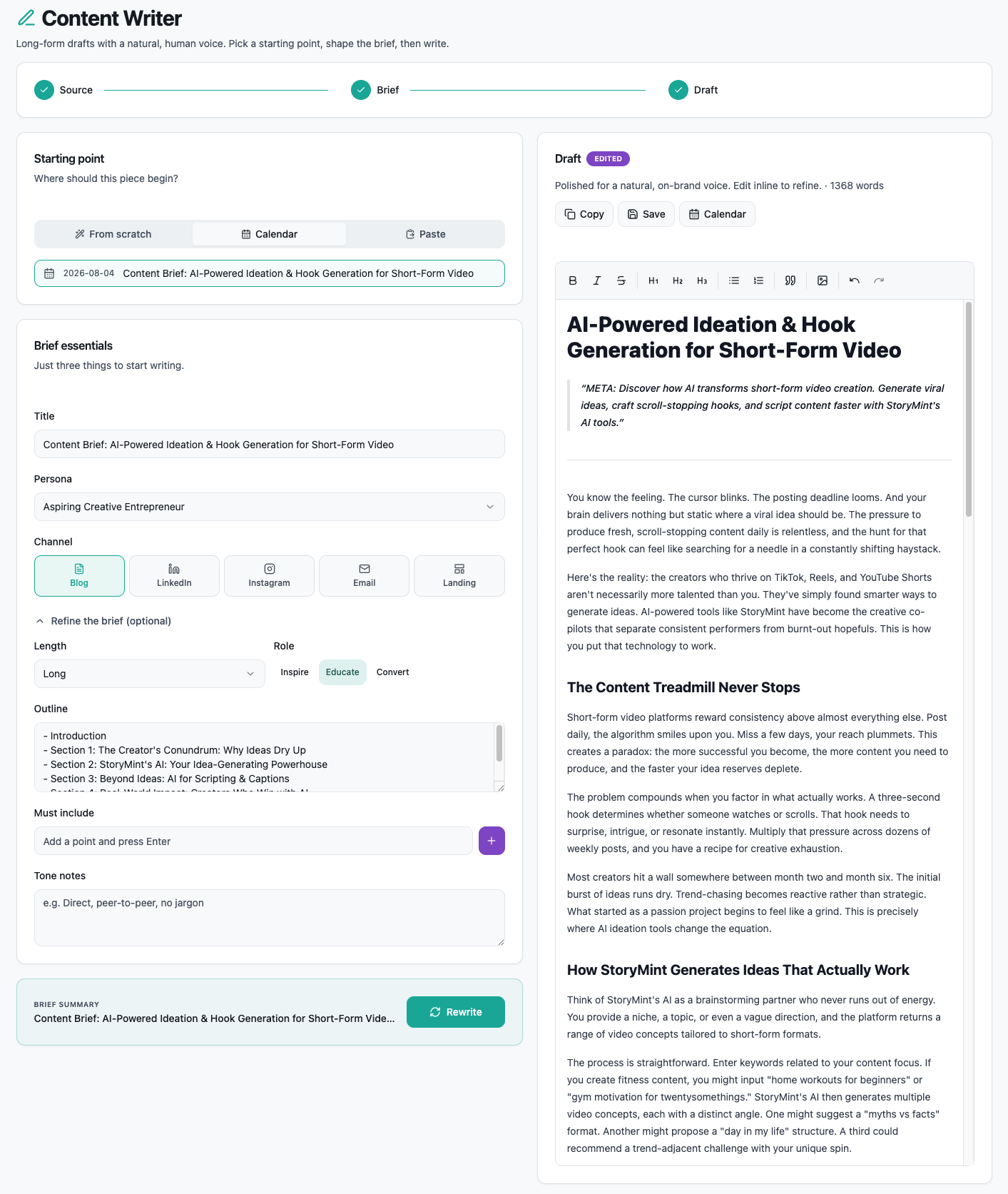
The last step is Content Writer, where the brief becomes actual copy. Pick your starting point, which can be a brief pulled straight from your calendar, a paste, or from scratch. Confirm the Brief essentials: the title, the persona, and the channel. StoryMint supports Blog, LinkedIn, Instagram, Email, and Landing, and it adapts the writing to whichever you pick.
If you want more control, open Refine the brief. Here you set the length, choose a role of Inspire, Educate, or Convert, adjust the outline, add any must-include points, and drop in tone notes like "direct, peer-to-peer, no jargon." These settings steer the voice so the draft sounds like you, not like a template.
Then StoryMint writes the draft in the panel on the right, polished for a natural, human voice. You can edit it inline to refine any line, then Copy or Save when it is ready. From a single gap, you now have a finished, on-brand piece.
Putting it all together
The whole loop, persona to keyword to gaps to brief to draft, is designed to remove the guesswork from content. You are not staring at a blank page wondering what to write. You are starting from a proven opening, backed by real search data and mapped to a real audience.
A simple rhythm works well: run one analysis per persona each week, generate briefs for the two or three highest-priority gaps, add them to your calendar, and write them when they come up. Do that consistently and your content stops being a series of guesses and starts being a pipeline of pieces your audience is already looking for.
Ready to find your first gap? Open the Content Gap Analyzer, pick the persona you write for most, and run one analysis. The openings are already there. StoryMint just makes them easy to see.


