
How to Improve Content With Search Console AI Reports
A five-step review for turning Google AI-feature visibility into one stronger content decision without artificial shortcuts.
 Joe HandayaChief Product Officer
Google has started rolling out a dedicated Search Generative AI performance report in Search Console. It can show when pages from your site appear in Google generative AI features, but it is not a score for "AI ranking". It is not a complete attribution model. And it says nothing about how your brand appears in ChatGPT, Claude, Perplexity, or another provider.
For a lean team, that limitation is useful. It stops the report becoming another dashboard to watch. Use it to make one better choice about an existing page.
Not every property can use it yet. Google says the report is rolling out to a subset of websites. If it is not in your Search Console property, skip to the alternative workflow below. There is no setting that turns it on.
Start with the report's limits
The report gives a dedicated view of impressions in Google's generative AI features. Google says it can be viewed by page, country, device for Search, and date. It does not present itself as a query report, a measure of revenue, or proof that a page persuaded a visitor to act.
That means each number needs context. A page may earn AI-feature impressions because it is relevant to part of a question, while still leaving the reader without a clear answer. A change in impressions after an edit may be a useful observation, but it cannot show on its own whether the edit caused a business result.
Use the report to find a page worth inspecting. Then use normal Search Console performance data, audience evidence, and the page itself to decide what to change.
Pick one page worth improving
Start in the Pages view and choose one URL. Do not turn every visible page into a workstream.
A good candidate is an important page that appears in the report but has a weak answer to a reader's job. Perhaps the page receives visibility for a problem your ideal customer has, but the opening section leads with the company instead of the problem. Perhaps the page answers a broad question but does not help a small team choose a next step.
Write down four things before editing:

The URL and the page's current purpose.
The audience job it should help with.
The evidence that made it a priority.
One clear change you expect a reader to notice.
This is deliberately small. A single page gives you a defensible record of what changed. A batch makes it hard to learn which choice improved the experience.
Match the page to a reader job
Search data can show that a page has an opportunity. It cannot tell you whether the page understands the person arriving there.
Use a real audience insight to complete the sentence, "This page should help someone who needs to..." A content manager with a small team may need a way to choose a page to improve without starting another content project. An agency owner may need a way to explain an AI-feature signal without claiming more certainty than the data supports. Those are different jobs, even if both people search for content advice.
If your audience definition is still broad, start with audience personas. The point is not to add more labels. It is to identify the pressure, decision, and constraint that make one answer useful.
A useful test follows naturally. Read the page's first screen and ask whether it names the reader's problem, gives them a next move, and makes the scope clear. If it does not, visibility is not yet value.
Make the page more useful
Google's current guide to generative AI features does not call for a separate set of AI-only pages. It points back to foundational SEO, clear technical structure, useful non-commodity content, and relevant high-quality images.
For the page you selected, make the improvement concrete:
Put the reader's question near the start and answer it plainly.
Add experience, decision criteria, examples, or practical detail that a broad summary would miss.
Check that product, pricing, feature, and availability facts are current and consistent.
Use headings that help a reader find the part they need.
Add a relevant image only when it clarifies the point, such as a simple workflow or decision test.
Check that the page remains crawlable and eligible to appear in Google Search.
Do not respond by creating a page for every related AI query. Google's guidance warns against building pages around fan-out variations simply to influence AI features. It also says you can ignore shortcuts such as artificial content chunking and unnecessary llms.txt files. A special schema block cannot make an unhelpful page useful.
The question is simpler: after the edit, would the intended reader get a clearer answer than before?
Log the change and read the pattern
Keep a short change log. Record the date, URL, reader job, edit, generative-AI-feature impressions, normal Search Console performance, and any page or conversion signal your team already trusts.
This protects you from drawing a large conclusion from a small movement. If impressions rise but the page still fails to help the intended reader, the next task is not to celebrate the chart. It is to inspect the page again. If the page becomes clearer but impressions do not move quickly, the edit may still have been worth making for people who reach it through other paths.
Google is also clear that satisfying technical and quality requirements does not ensure that a page will be crawled, indexed, or displayed in a generative AI feature. Treat the report as a repeated observation, not a promise.
When the page shows but still disappoints
Use this quick decision test before you create more content.
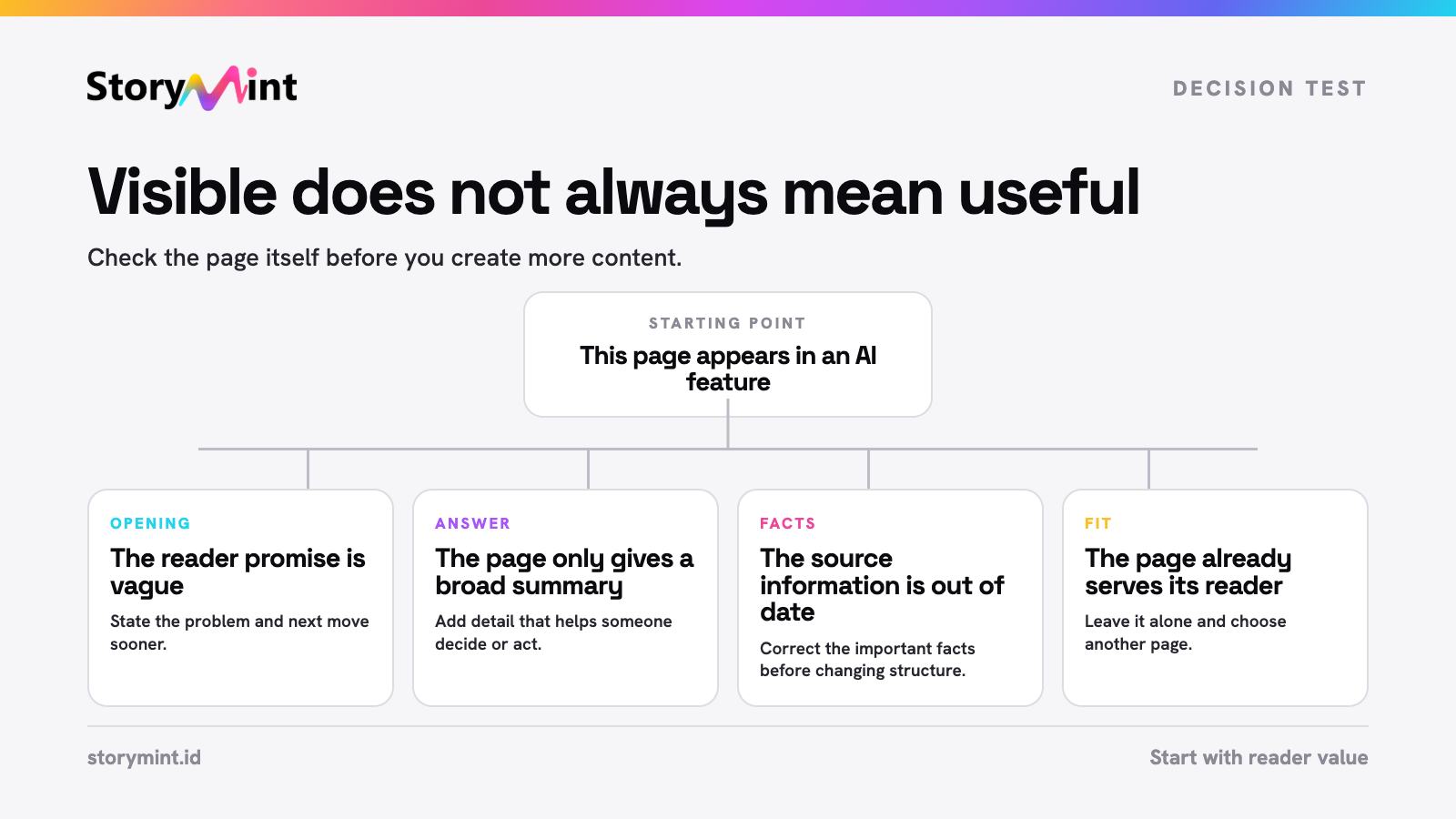
If the page is visible but the opening is vague, improve the opening and reader promise.
If the page has a clear opening but contains only a broad summary, add the useful detail that helps someone decide or act.
If the page is helpful but its facts are old or inconsistent, correct the source information before changing its structure.
If the page already does its job well, leave it alone. Choose another page or use audience research to find a missing need.
If you cannot explain the reader job in one sentence, do not edit from the report alone. Return to audience evidence first.
This is where a content gap analysis can help. A gap should represent a real unanswered need, not a loose collection of AI-related phrases.
Work without the new report
A missing report does not prevent a useful review. Start with normal Search Console performance data and choose one page with a relevant reader job. Then use the same checks: does the page answer the job clearly, offer useful detail, contain current facts, and give the reader a logical next step?
The important discipline is unchanged. Improve one page for one audience need, log the change, and review the result. Do not wait for a new report before making content clearer.
Turn the signal into a better brief
When you find a page that needs work, turn the reader job into a brief before anyone starts writing. Define the audience and decision behind the page before deciding what the writer needs to change.
Create a StoryMint campaign, use the strongest audience insight to define the page's job, and give the writer a brief that makes the next improvement specific.


